AI Video Management System

See everything.
Miss nothing.

Ividiyo is enterprise AI video surveillance for IP cameras — self-hosted, zero per-camera licensing. Built for scale.

10,000+
Cameras supported
500+
Cameras on a single site
12,000+
Hours recorded daily
150+
Cameras per GPU
100%
Self-hosted
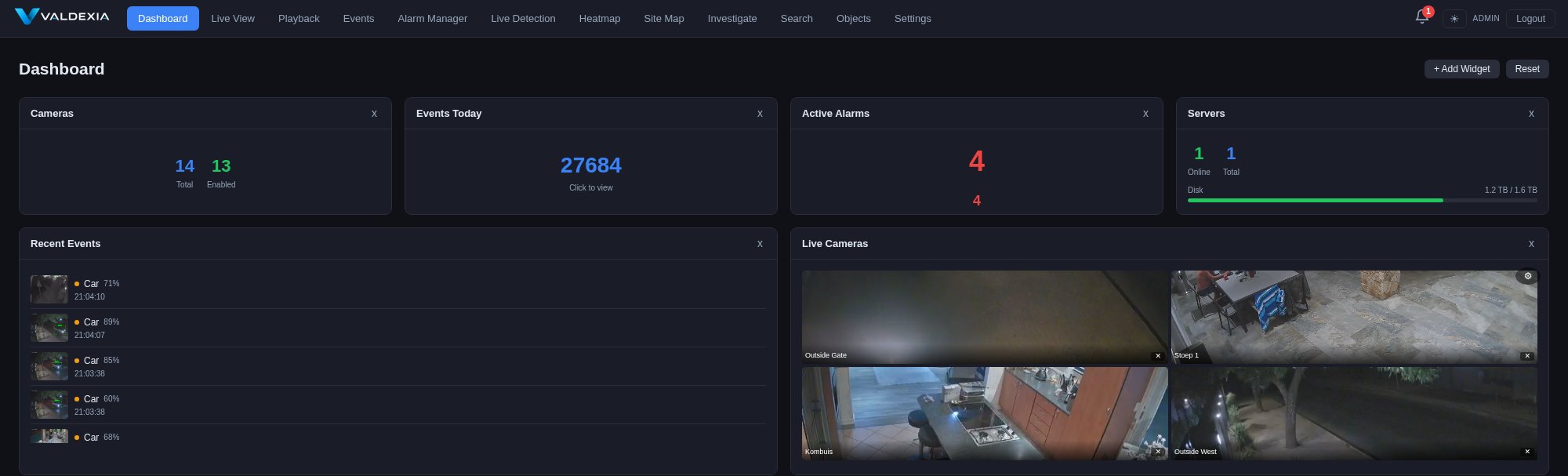
Ividiyo dashboard — live cameras, recent AI detections, alarms and server health

The Platform

One platform. Total visibility.

Live monitoring, AI detection, forensic search, and response, in one self-hosted system.

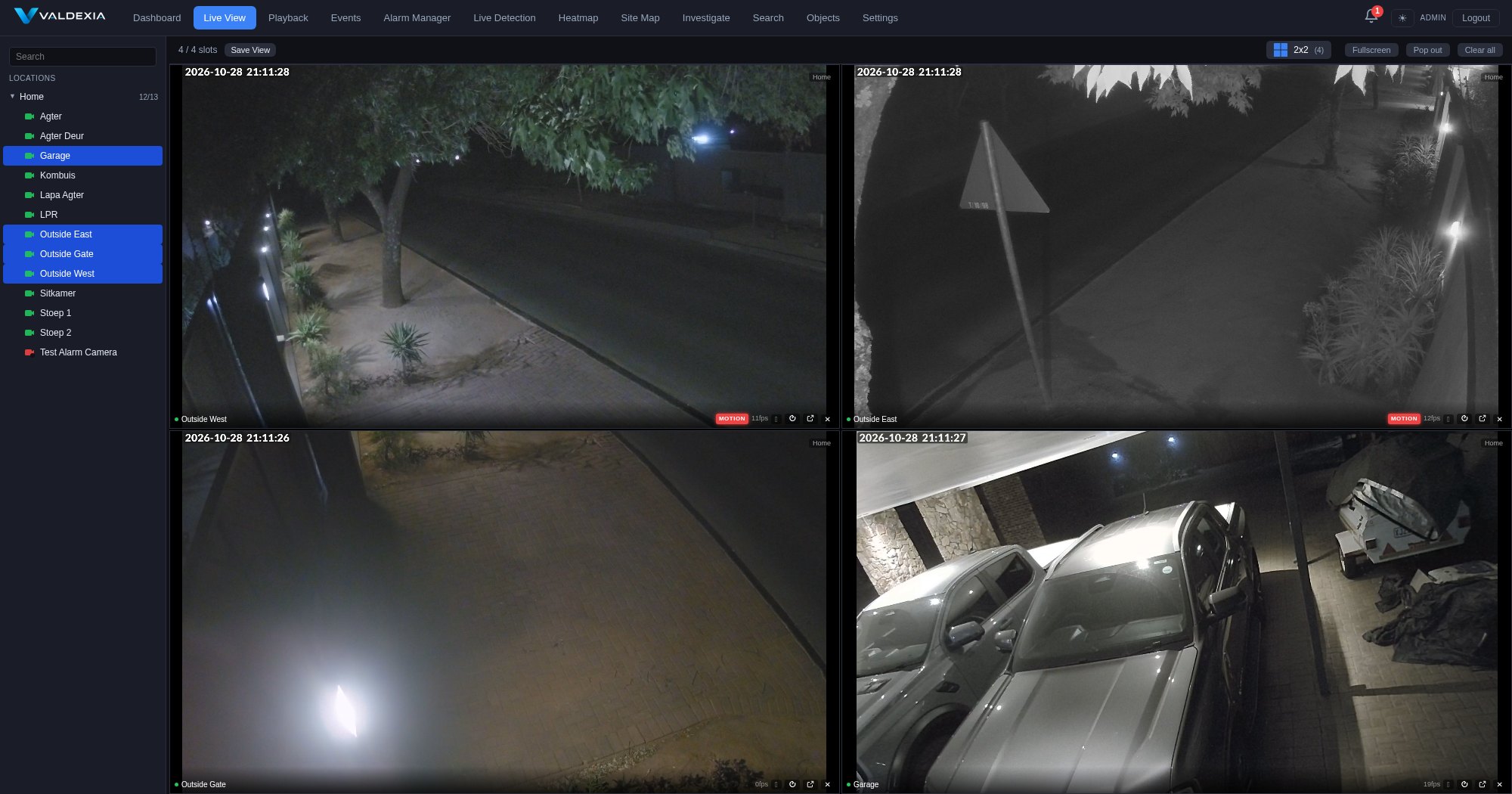
Live View — multi-camera WebRTC grid
Live View

Every camera, sub-second latency

WebRTC streaming straight from your servers — no plugins, no lag. Grids up to 10×10, saved views, fullscreen walls, PTZ control, and instant motion badges.

  • Location tree — group cameras by site, area, or building
  • ONVIF PTZ with joystick and CCTV keyboard support
  • Pop-out windows for multi-monitor control rooms
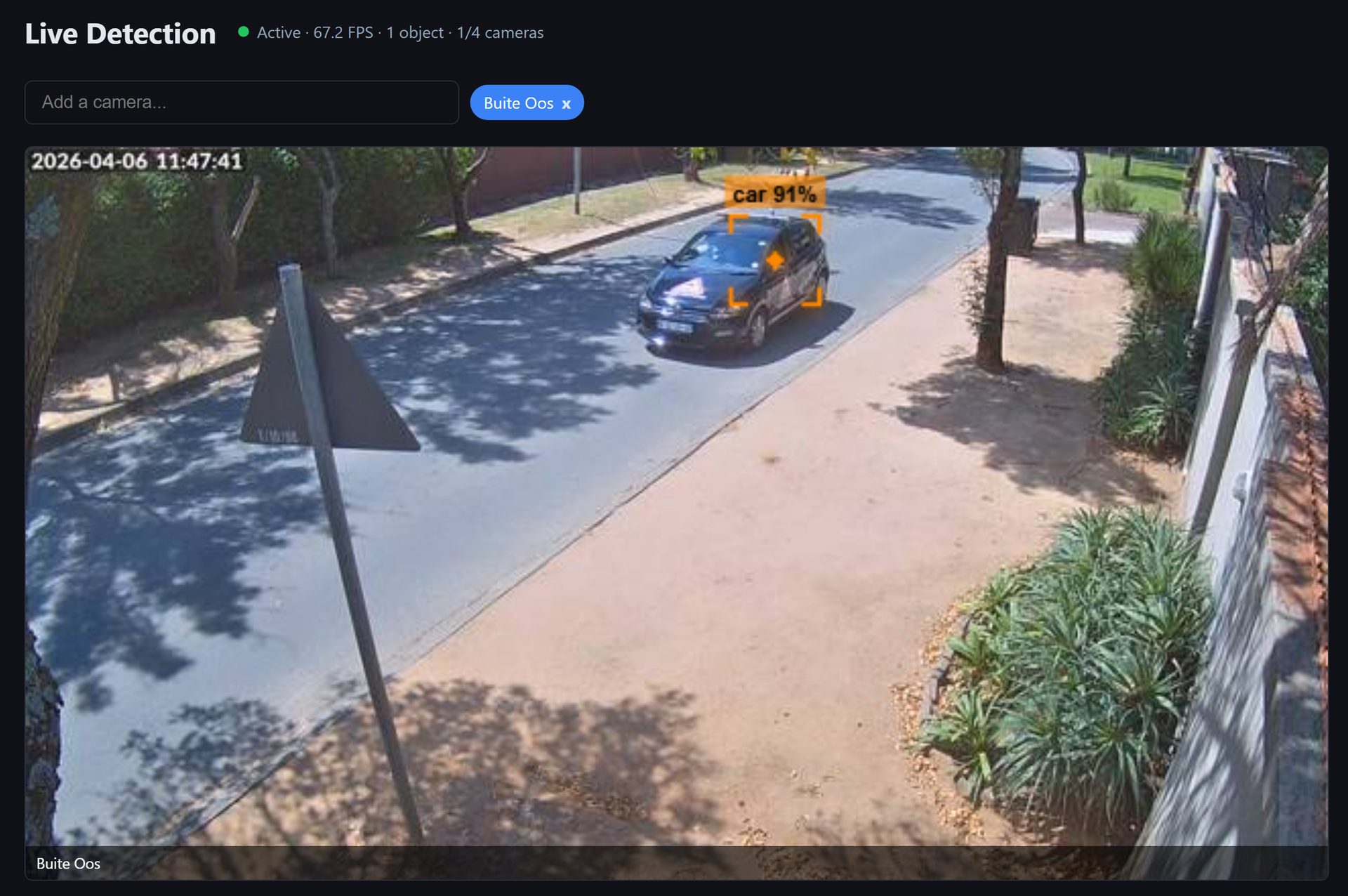
AI Detection — real-time object detection
AI Detection

Detection that understands your site

GPU-accelerated detection of people, vehicles, animals, and 80+ object classes — with per-zone class filtering so a delivery gate and a perimeter fence each watch for the right things.

  • License plate recognition (LPR/ANPR) with watchlist & blacklist alerts
  • Face recognition with enrolment and alerts
  • Detection, exclusion, privacy-mask, and delivery zones per camera
  • Custom model training from your own flagged detections
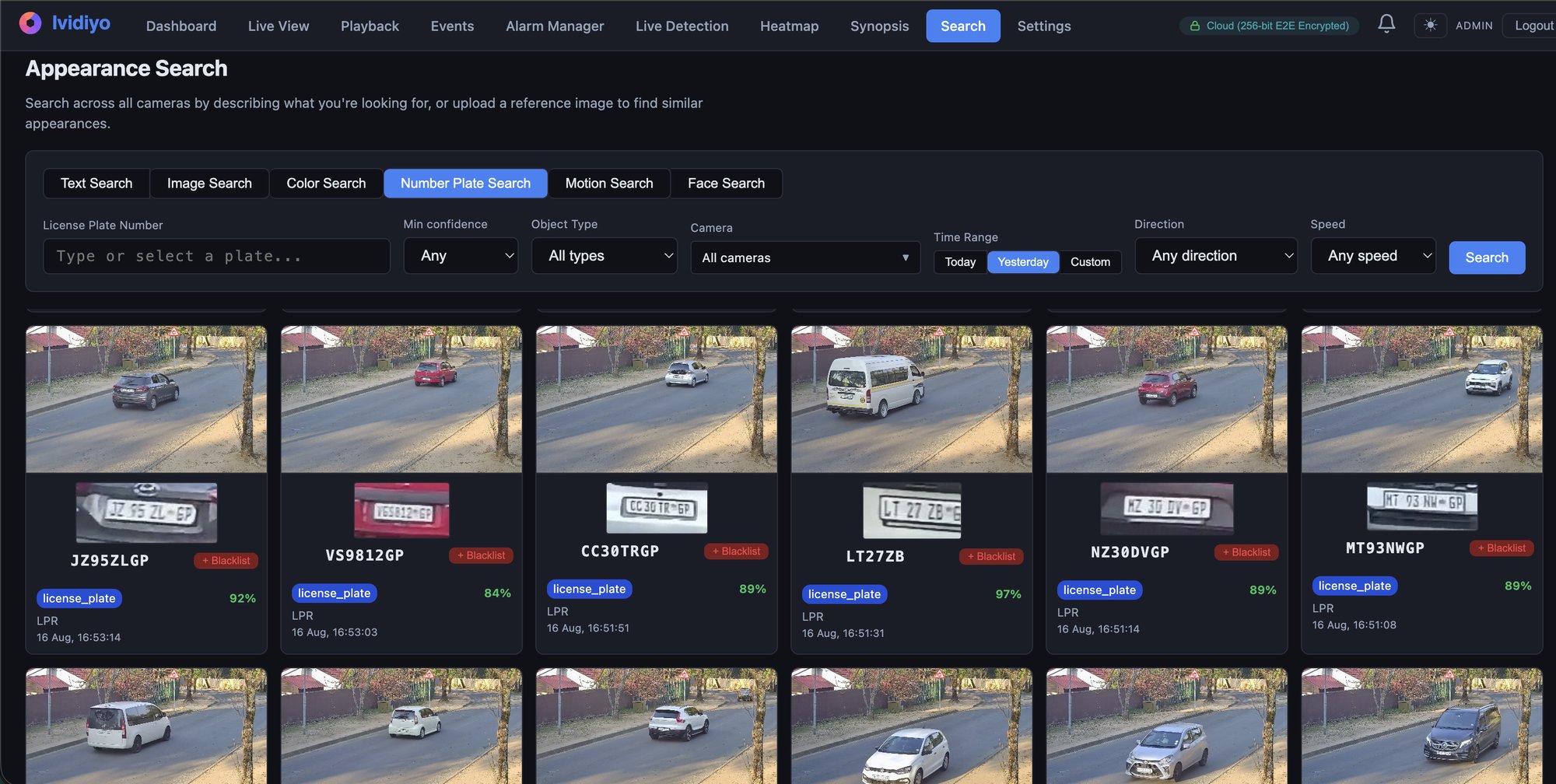
Forensic search — number plate search results
Forensic Search

Find anything, in seconds

Six ways to search days of footage: describe what you're looking for in plain language, upload a reference photo, or search by plate, face, colour, or motion in a specific area of the frame.

  • Text search — “man in a red jacket” across all cameras
  • Number-plate search with direction and speed filters
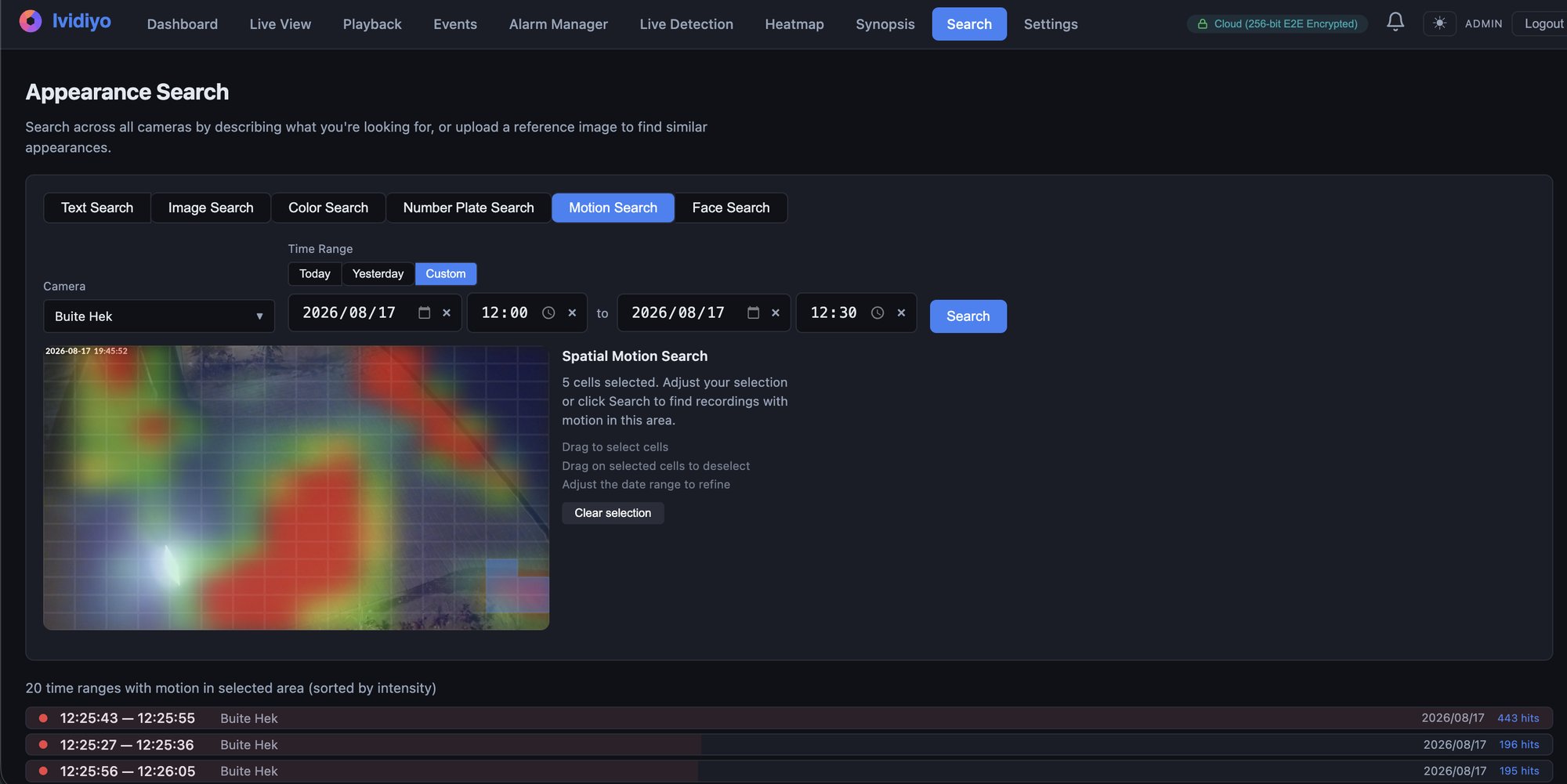
  • Spatial motion search — draw an area, find every movement in it
  • Video synopsis — hours condensed into a minutes-long summary
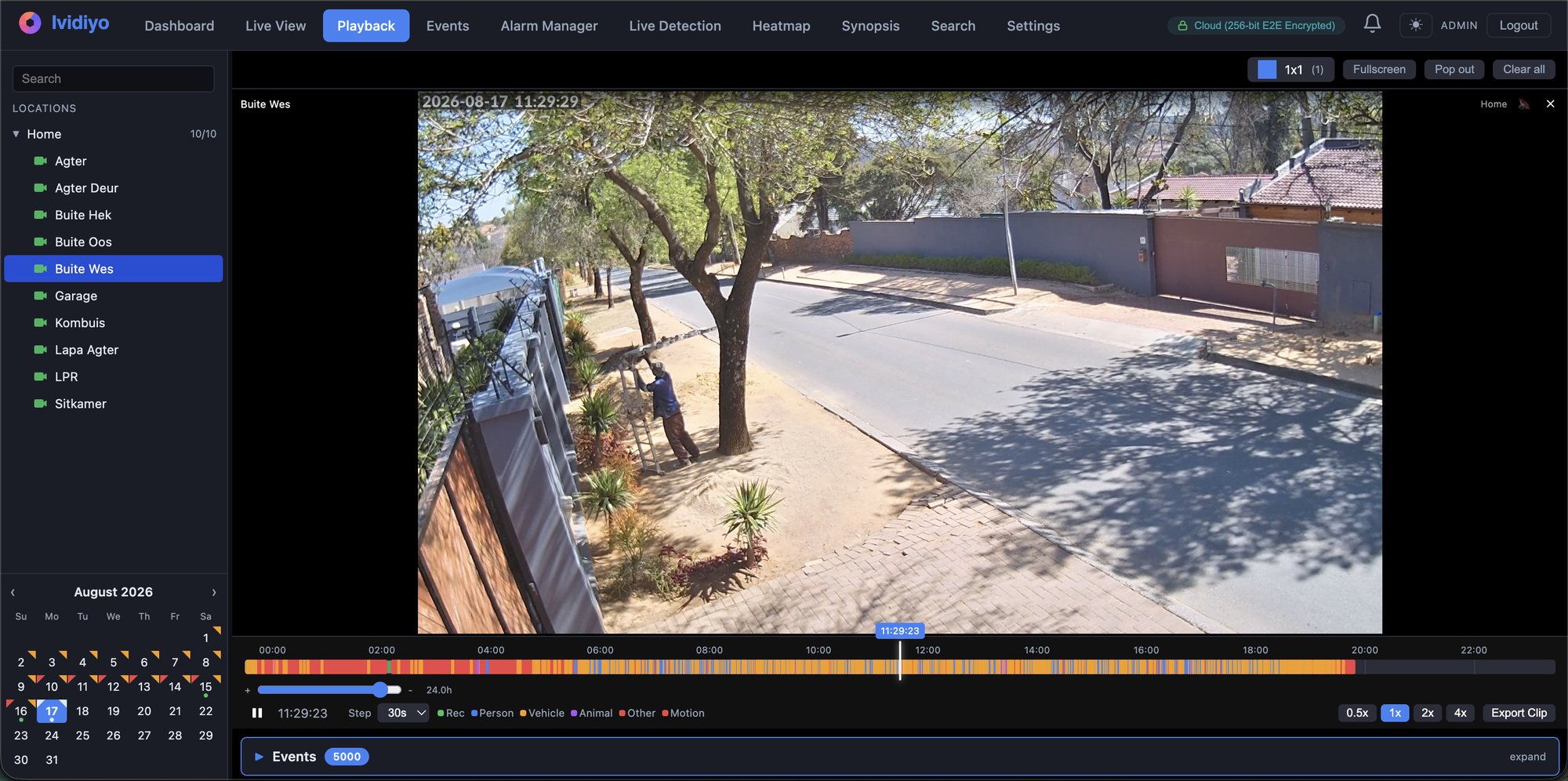
Playback — timeline with event markers
Playback & Response

From event to evidence

Scrub a colour-coded timeline where every person, vehicle, and motion event is marked. Jump to the moment, export the clip, and let the alarm manager walk your team through the response.

  • Alarm manager with SOP checklists and escalation levels
  • Notifications via email, Telegram, Discord, and webhooks
  • One-click clip export for evidence handover

Capabilities

The full capability wall

Feature availability depends on your plan; see pricing for what each tier includes.

See

  • WebRTC live grids up to 10×10
  • Customisable dashboard widgets
  • ONVIF PTZ, joystick & CCTV keyboards
  • Multi-monitor pop-out views
  • iOS & Android apps with live & playback

Detect

  • 80+ object classes, GPU-accelerated
  • LPR/ANPR with plate blacklist
  • Face recognition & enrolment
  • Per-zone class filters & privacy masks
  • Custom model training

Search

  • Plain-language appearance search
  • Image & colour similarity search
  • Number-plate search
  • Spatial motion search
  • Video synopsis

Respond

  • Alarm manager with SOP checklists
  • Escalation levels per alarm
  • Email, Telegram, Discord, webhooks
  • Clip export for evidence
  • Event log with class filtering

Scale

  • Multi-server distributed recording
  • Automatic server failover
  • Multi-site location tree
  • Tiered storage pools (SSD + NAS)
  • Role-based access control
  • ONVIF camera autodiscovery
  • Server health & GPU monitoring

Access & integrate

  • Browser-based — no client to install
  • End-to-end encrypted remote access
  • Peer-to-peer — no port forwarding
  • Cloud portal for multi-site sign-in
  • Home Assistant integration
  • Analytics heatmaps per class

Runs on your hardware

From a Raspberry Pi to a server rack

The same software scales from a single-board computer at home to multi-server estates — you only change the hardware.

Small

Raspberry Pi 4 or 5

Ideal for homes and small sites. A Pi 4 with a Coral USB accelerator is the floor; a Pi 5 with the Hailo AI HAT does more of it, faster. Either way the recordings need a real disk.

  • Pi 5: up to ~10 cameras, Hailo AI HAT, NVMe via M.2
  • Pi 4: fewer cameras, Coral USB for AI, no M.2 (no PCIe)
  • Recordings on NVMe or a USB 3.0 drive
  • SD card for the OS only — it won't survive 24/7 recording
  • Whisper-quiet, pocket-sized
Medium

Single server + GPU

One off-the-shelf box runs recording, AI, and analytics for an entire property. An NVIDIA GPU powers the AI features — a single mid-range card handles every camera on site.

  • 150+ cameras on one GPU — proven in production
  • Recording never re-encodes, so CPU stays low
  • Full suite: LPR, face recognition, appearance search, synopsis
  • Local SSD for recent footage, NAS for long-term retention
  • ONVIF autodiscovery — add cameras in minutes
Large

Multi-server cluster

Recording servers scale horizontally under one management plane — add a server, assign cameras, done. Built for estates, campuses, and multi-branch operations.

  • 500+ cameras per site, multiple sites in one console
  • Automatic server failover — recording and playback carry on if a server drops
  • Tiered storage pools per server (SSD + NAS)
  • Location tree — regions, sites, and buildings in one view
  • Role-based access for control-room teams

Built for

Where Ividiyo works

Residential estates

Plate recognition at the gate, blacklist alerts before the boom lifts, perimeter zones that ignore wildlife but flag people — at 500-camera estate scale.

Key features: LPR + blacklist, electric fence integration, perimeter zones, alarm SOPs for the control room

Retail & commercial

After-hours intrusion alarms, activity heatmaps of customer flow, and instant forensic search when something goes missing — across every branch.

Key features: heatmaps, appearance search, multi-site console, role-based access

Industrial & logistics

Track vehicles through the yard by plate, watch loading bays with delivery zones, and keep footage on-premises where your compliance team needs it.

Key features: number-plate search, PTZ control, delivery zones, self-hosted retention

Homes & small sites

A Raspberry Pi 5 with a Hailo AI HAT, recording to an NVMe or a USB drive, runs full AI detection for the whole property. Watch from your phone anywhere — footage never leaves your house.

Key features: Pi 5 support, iOS & Android apps, E2E-encrypted remote access, free tier

Perimeter

A fence alarm that shows you what tripped it

An electric fence tells a control room that a zone was disturbed. It cannot say whether that was a branch, an animal, the weather, or someone cutting through — so the client either rolls a vehicle on everything or quietly stops trusting the alarms. Ividiyo puts the camera covering that stretch of fence in front of the operator the moment the zone trips.

Video-verified zone alarms

The energiser raises the alarm; Ividiyo opens the camera on that zone — live, and the seconds before it. Object detection tells a person from an animal, so the decision rule gets simple: a person on camera, send someone; nothing on camera, log it and look at it later.

The fence on a site map

Draw your fence line over an aerial image of the property and give each zone its cameras and its energiser. The zone flashes when it trips and opens the live view when you click it, and energiser state — armed, off, low voltage, alarm — reads straight off the map.

A procedure, not just a siren

Every fence alarm carries an SOP checklist and escalation levels, so the operator is walked through the response and an alarm nobody acknowledges moves up the chain instead of ageing on a screen.

Works with the energiser you already have

Any energiser with a siren, strobe or alarm output will drive it, through a dry contact or relay input. Nothing proprietary on the fence side, no firmware to change, and no reason to replace a unit that is already in the ground. Tell us what you run and we will confirm the wiring for your panel before you commit.

Integrations

Connects to what you already run

Ividiyo takes input from the rest of the site rather than replacing it. Anything that can close a contact, post to a URL or publish on a topic can raise an alarm here and cue the camera that covers it.

Where the integration already exists it is a configuration step, and using it costs nothing further: there is no add-on licence and no fee per integrated device, which is the part most vendors charge for. Where it does not exist yet we scope and quote it with the rest of the project — usually a short piece of work rather than a research exercise, because the connection is nearly always an API, a webhook or a contact closure.

Cameras

Any ONVIF or RTSP camera, whatever the make. Autodiscovery, PTZ, presets and camera-side events come with them.

Network video recording

Multi-server recording with failover, tiered retention and a single console across every site.

Analytics

Detection, classification and tracking run on your own GPU. Third-party analytics feed in as events over the API.

Automatic number plate recognition

Plate reads from any camera, with watchlists, visitor management and searchable history.

Facial recognition

Enrolment, search and alerts, running on your hardware alongside the rest of the detection pipeline.

Perimeter monitoring

Electric fence, beams and gate sensors raise a zone alarm with the camera covering that stretch already open.

Alarm panels

Any panel that can close a contact or post to a URL raises an alarm here, with an SOP and escalation attached.

Input output devices

Dry contacts and relay modules in both directions: take a trigger in, drive an output on an event.

Audio communication

Two-way audio through the camera from the browser or the phone app, so an operator can challenge someone on site.

Keyboards

Uniview KB1100, USB joysticks through the browser, and keyboard shortcuts for operators who would rather not use a mouse.

Storage

Tiered storage pools across local disk, NAS and cloud mount points, with policy-driven movement between them.

Supported protocols

ONVIF, RTSP, RTSPS, WebRTC, HLS, MQTT, REST and outbound webhooks, plus plain dry contacts.

Access control

Door and reader events linked to the camera on that door, with access history searchable beside the footage.

Fire panel

Panel events cue the cameras covering the zone and open the evacuation views on the wall.

Intercoms

Call events bring up the entrance camera and let the operator answer and see at the same time.

Building management

Plant and services alarms arrive as events with the relevant camera attached. Many reach us through Home Assistant today.

Environmental monitoring

Temperature, water, power and air-quality sensors raise alarms with video context, via Home Assistant or the API.

Command center management

Forward alarms to an existing control-room platform, or pull ours into it over the API.

Parking

Bay occupancy and barrier events tied to plate reads at the entrance and exit.

Weighbridge

Weight tickets matched to the plate and the footage of the vehicle on the bridge.

Retail systems

Point-of-sale exceptions linked to the till camera, so a void or a refund has video against it.

Body-worn cameras

Offloaded footage brought into the same timeline, search and evidence trail as the fixed cameras.

Video encoders

Analogue cameras brought in through any ONVIF or RTSP encoder, counted as ordinary channels.

Networking

Switch and link health raised as alarms beside camera and server health, via SNMP traps or the API.

Not on the list?

Ividiyo has a documented REST API, outbound webhooks, MQTT and plain dry-contact inputs, and a first-class Home Assistant integration that reaches a great deal more. Tell us what you run and we will tell you straight which of the three it is: already supported, a piece of development we will quote before you commit, or something we cannot do.

Camera support

Not tied to a camera brand

Ividiyo speaks ONVIF and RTSP, so the camera is your choice rather than ours. There is no proprietary hardware to buy, no approved-vendor list to buy from, and no reason to replace cameras that are already on the wall and working.

Cameras from these manufacturers work with Ividiyo. The list is not exhaustive — if a camera is ONVIF or RTSP conformant it will run, whatever the badge on the front of it.

360 Vision Technology
3S Vision
Aasset Security
Abus
ACTi
Amcrest
Arecont Vision
AV Costar
Avigilon
Avtech
Axis
Basler
Bosch
Canon
CNB
CP Plus
Dahua
Dakang Technology
Dedicated Micros
Digitus
Dynacolor
Etrovision
FLIR
FlexWatch
Geovision
Grandeye
Grundig
Hanwha Vision
Hikvision
Hitron
Honeywell
Huawei
Hunt Electronics
i-PRO
IDIS
Interlogix
JVC
LG
Lilin
Messoa
Milesight
Mobotix
Panasonic
Pelco
Provision-ISR
Reolink
Siqura
Sony
Speco
Sunell
TP-Link VIGI
Trendnet
Ubiquiti UniFi
Uniview
Vicon
Videotec
Vivotek
Zavio

Running in production today

Axis, Dahua, Hikvision, Reolink, Ubiquiti UniFi and Uniview are all recording on live Ividiyo systems right now, alongside the rest. Send us a model number before you buy and we will confirm it — and if a camera turns out to need work, we would rather tell you that up front than after the invoice.

Getting started

Up and running in an afternoon

No consultants, no certification courses. A guided installer takes you from bare hardware to live cameras.

1

Install on your hardware

Run the web installer on a Pi, workstation, or server. It sets up the database, services, and storage for you.

2

Discover your cameras

ONVIF autodiscovery finds cameras on your network — add them with a click, streams and recording start immediately.

3

Watch from anywhere

Link your cloud account and open the mobile app — remote access connects end-to-end encrypted, no port forwarding.

Works with the cameras you already own

Any ONVIF or RTSP IP camera — Hikvision, Dahua, Uniview, Axis, UniFi, Reolink, and hundreds more. No proprietary hardware, no camera lock-in.

Privacy by architecture

Your footage never leaves your premises

Ividiyo is fully self-hosted: video is recorded, analysed, and stored on your own hardware. There is no cloud upload, no third-party processing, and no vendor with a copy of your footage.

Self-hosted by design

All AI processing runs on your own servers. The system works fully offline — internet is optional, not required.

Encrypted remote access

Remote viewing is end-to-end encrypted (256-bit) and connects peer-to-peer. Even our relay can't see your video.

Privacy controls built in

Privacy-mask zones exclude neighbours and public space from recording, and role-based access controls who sees which cameras.

Why Ividiyo

The unfair advantage

What sets us apart from traditional monitoring vendors.

R0

Per-Camera Licensing

No per-camera fees. Annual or once-off perpetual licensing, priced by deployment size. Around 80% cheaper than the competition.

500+

Cameras per Site

Proven in production across multiple sites with distributed recording servers. Scales to 500+ cameras and beyond.

100%

Self-Hosted

Your data stays on your servers. Full control, no cloud dependency, no monthly subscriptions.

New — Ividiyo Mobile

Your cameras, in your pocket

Watch live, review footage, and stay on top of AI detections from anywhere — right from your phone.

Home Direct
Events · Today 3
Truck
Front Gate · 2 min ago
Vehicle
Driveway · 14 min ago
Animal
Garden · 41 min ago
Cameras
Events
Settings

Live from anywhere

Encrypted, peer-to-peer video straight to your phone — even on mobile data. No port-forwarding, and an automatic secure relay when a direct link isn’t possible.

AI event feed

See every person, vehicle and detection as it happens, grouped by day. Tap any event to jump straight to the recording of that moment.

Playback & review

Scrub a smooth timeline, filter events by type, and pinch-to-zoom event images to catch the detail that matters.

Available on iPhone and Android. Your footage stays on your own servers.

Smart home ready

First-class Home Assistant integration

Install the Ividiyo integration from HACS and every camera, motion sensor, and AI detection becomes a Home Assistant entity — ready for dashboards and automations.

Live camera feeds and snapshots as native entities

Motion and zone-occupancy binary sensors per camera

AI detection and licence-plate events for automations — open the gate on a known plate

Custom Lovelace cards: camera wall, event feed, and status bar

Browse and play event clips in the HA media browser

PTZ, clip export, and alarm acknowledge as HA services

See it in action

Product screenshots

Real screenshots from a live 160-camera deployment.

Live View — multi-camera grid

Live View — multi-camera grid with WebRTC streaming

AI Detection — real-time object detection

AI Detection — real-time object detection with bounding boxes

Dashboard — operational overview

Dashboard — customisable widgets with live stats

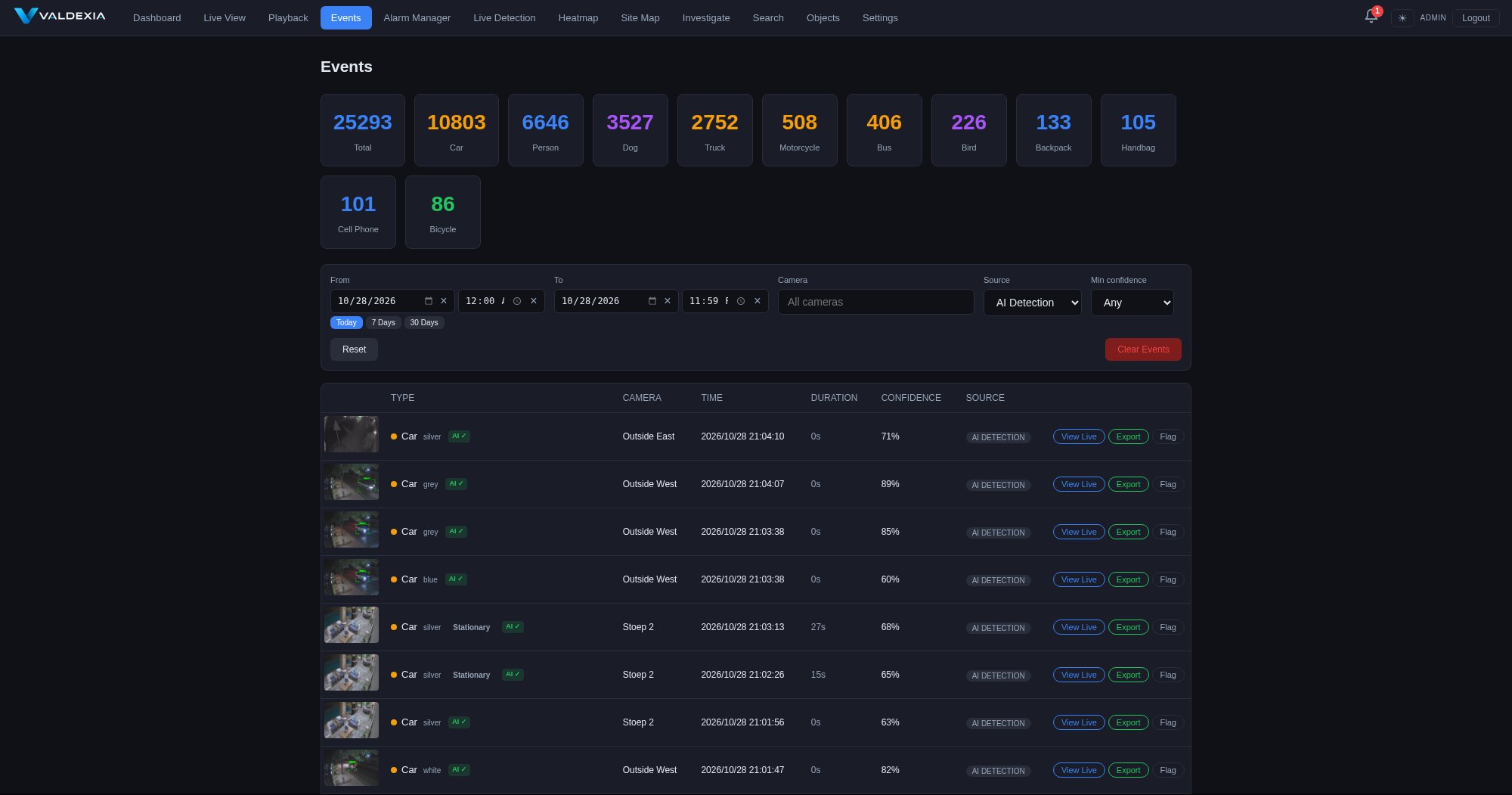
Events — AI-detected event log

Events — AI-detected event log with thumbnails and filtering

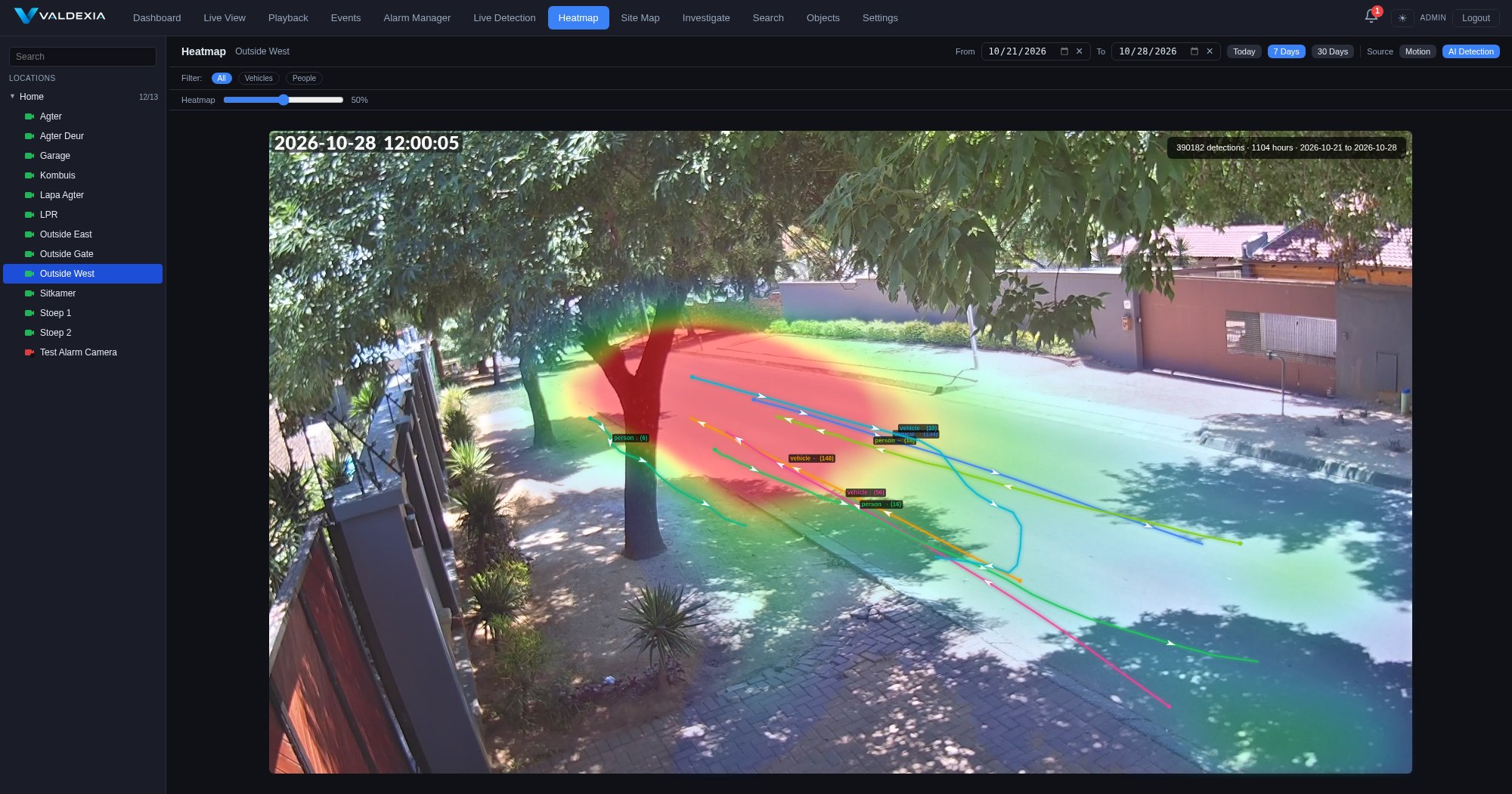
Heatmap — activity analytics

Heatmap — per-class activity analytics overlay

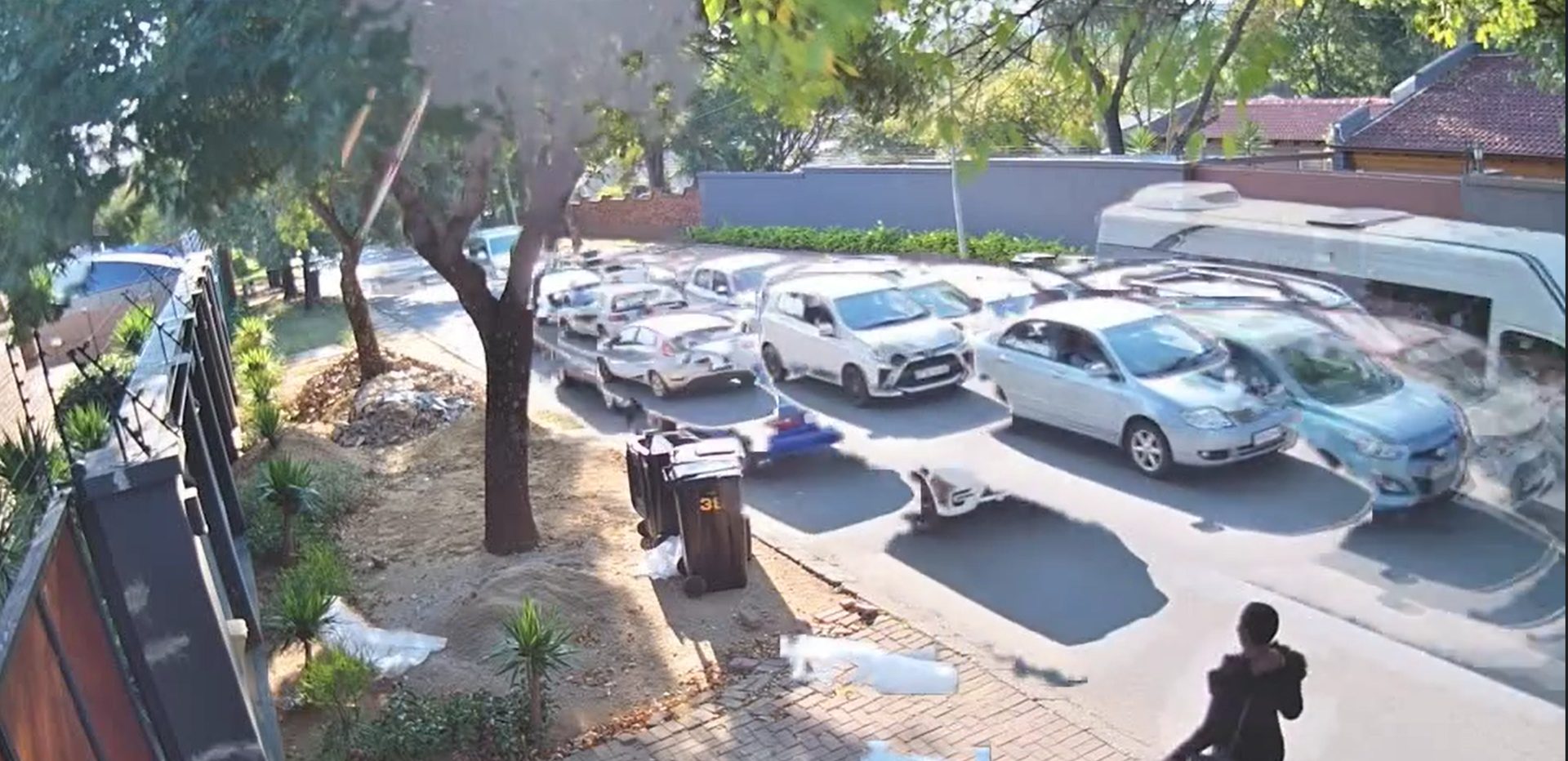
Video Synopsis — condensed footage review

Video Synopsis — hours of footage condensed into minutes

Server Statistics — hardware monitoring

Motion Search — draw an area, find every movement in it

Detection Zones — configurable zones and settings

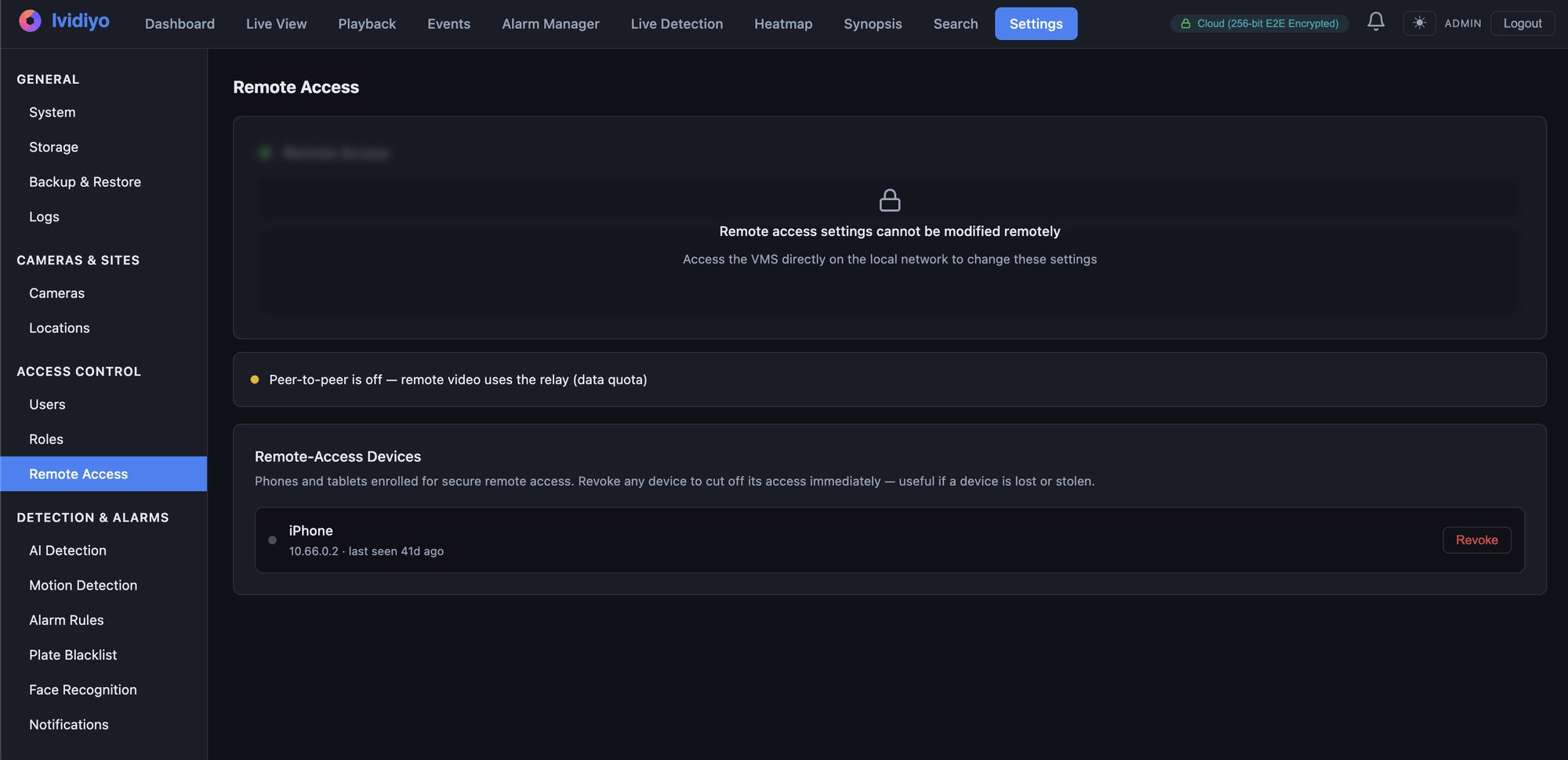
Remote Access — E2E-encrypted, with per-device revocation

Pricing

Simple, predictable pricing

No per-camera fees. Every AI module — object detection, plate recognition, appearance search, anonymisation and face recognition — is included in Professional and Enterprise, not sold as an extra. All prices are in South African rand and include VAT — what you see is what you pay.

Free
R0
Up to 10 cameras
  • Live view and recorded playback
  • Single server recording
  • ONVIF discovery and time sync
  • Motion detection
  • Clip export
  • Mobile app included — iOS & Android
Get Started
Best value
Home
R850/year
Up to 10 cameras · everything in Free, plus:
  • AI object detection and tracking
  • License plate recognition (LPR)
  • Heatmaps and analytics
  • Video synopsis
  • Appearance search
  • Alarm manager with notifications
Upgrade
Professional
Priced by camera count · every software module included

PTZ and CCTV keyboard control, interactive maps, forensic search with colour filtering, camera tamper and lens checks and the REST API — on top of everything in Home, at the camera counts below.

Cameras Annual licence Perpetual (once-off) Ividiyo Care/yr Premium 24/7/yr, per site
Up to 32 R6,900 R17,250 R3,450 —
Up to 64 R11,900 R29,750 R5,950 R15,000
Up to 128 R19,900 R49,750 R9,950 R15,000
Up to 200 R27,900 R69,750 R13,950 R18,000
Contact Sales
Enterprise
Priced per recording server, minimum two · unlimited cameras

Multi-server distributed recording, federated multi-site and automatic server failover — plus evidence management with a chain-of-custody audit trail, SSO and Active Directory, white-label, custom development and on-site installation, on top of everything in Professional.

Annual licence
R59,900/server
Perpetual (once-off)
R149,750/server
Ividiyo Care / yr
R29,950
Premium 24/7 / yr, per server
R18,000/server
Contact Sales

Annual licences include updates and business-hours support. Nothing else to buy. Every price on this page is VAT inclusive.

Perpetual is a once-off licence, available on Professional and Enterprise. Free and Home stay free and annual.

Ividiyo Care keeps updates and support running on a perpetual licence, at 20% of the perpetual price a year. It works out to half the annual licence, so perpetual plus Care breaks even with annual in year five and costs less every year after that.

Premium 24/7 is remote support around the clock with a one-hour response on critical faults, priced per site on Professional and per server on Enterprise — so a minimum of R36,000 on Enterprise. On-site callouts are billed separately at after-hours rates. Professional up to 32 cameras is business-hours support only; every other tier can add it.

Included

Every software module, in the price

These used to be paid add-ons. They are now part of Professional and Enterprise. “Module” means our own software, below — integration work against third-party hardware is scoped and quoted with the project. Every AI capability is still off by default and switched on per camera by you, and Ividiyo is fully self-hosted — all processing runs on your own hardware, and no video ever leaves your premises.

AI Object Detection

People, vehicles and 80+ classes on your own GPU. Per-zone class filtering, heatmaps and live overlay when you enable it.

License Plate Recognition

Read plates from any camera. Watchlist matching, visitor management, stolen vehicle database integration.

Appearance Search

Search your own recordings in plain language — “white truck” — instead of scrubbing hours of footage.

Video Anonymisation

Face and plate redaction for POPIA and GDPR. Export anonymised clips for third parties.

Access Control Integration

Door-camera linking, access events and mustering, built against your controller as part of the project. Ask us about yours.

Face Recognition

Enrolment, search and alerts, running on your hardware alongside the rest of the detection pipeline.

Comparison

How we compare

300 cameras with AI detection and plate recognition

Traditional VMS
300 camera licences
Base licence
Analytics plug-in
LPR plug-in
from R560,000
Plus annual maintenance fees
Ividiyo
Enterprise, two recording servers
AI object detection — included
Plate recognition — included
Appearance search, anonymisation, face recognition — included
R119,800/year
No per-camera licences. Around 80% less.

Taking this to a budget meeting? Download the product brochure (PDF) — every tier, the comparison table and the 2,500-camera arithmetic, in four pages.

Competitor figures are converted from published USD list prices at R16.54 to the dollar, October 2026, before tax — the Ividiyo figure includes VAT, so the real gap is wider than it looks. Perpetual licensing brings the Ividiyo figure to R299,500 once off, with Ividiyo Care at R59,900 a year.

Switching

Already running something else?

Keep the cameras on the wall and change the software underneath them. Any camera that speaks ONVIF or RTSP carries across, so the switches, cabling and storage stay exactly as they are. Side-by-side comparisons you can check against each vendor's own published material.

See all VMS alternatives, or read about running it self-hosted on Ubuntu. Or take it with you — the brochure (PDF) carries all five comparisons.

Trusted by

What our clients say

“

We evaluated Milestone and several other platforms before choosing Ividiyo. The cost difference was staggering — we deployed 350 cameras with AI detection across our infrastructure for a fraction of what a single competitor quoted us for cameras alone. The system has been running in production for months without a hiccup, and the AI detection picks up things our operators would have missed. It's not just a budget alternative — it genuinely outperforms what we had before.

LR
Lukas Richter
CTO — Africa Telecoms
350
Cameras
“

In mining, downtime means lost production. We needed a surveillance system that could handle harsh environments across multiple shafts and surface operations — over 500 cameras, and it had to be reliable. Ividiyo gave us the scale without the licensing nightmare. The AI detection has already caught unauthorised access attempts that would have gone unnoticed, and the alarm system with Telegram notifications means our security team responds in seconds, not minutes.

JE
Johan Esterhuizen
Head of Security — Sibenza Mining
500+
Cameras

FAQ

Common questions

Which cameras work with Ividiyo?+

Any IP camera that speaks ONVIF or RTSP — which covers virtually every brand: Hikvision, Dahua, Uniview, Axis, UniFi Protect, Reolink, and hundreds more. There's no camera licensing and no approved-hardware list.

Do I need an internet connection?+

No. Recording, AI detection, playback, and search all run locally on your hardware. Internet is only needed for remote access from outside your network and for licence activation.

Do I need to install software on every workstation?+

No. Ividiyo runs in the browser — live view, playback, search and administration are all a web interface, so there is nothing to install on an operator's machine, no per-seat client licence, and no plugin to keep version-matched to the server. Adding a user is a login, not a desktop rollout. Native iPhone and Android apps are there as well, included on every plan, but they are an extra way in rather than a requirement.

What hardware do I need for the AI features?+

A GPU or AI accelerator: an NVIDIA GPU on servers (one mid-range card handles 150+ cameras), or a Hailo AI HAT on a Raspberry Pi 5. Recording and playback work fine without one — you can add AI later.

Where is my footage stored?+

On your own hardware — local SSDs for recent footage, with optional NAS pools for long-term retention. Nothing is uploaded to any cloud, and remote viewing is end-to-end encrypted.

Can I start free and upgrade later?+

Yes — the Free tier runs up to 10 cameras with live view, recording, playback, and clip export. Paid tiers unlock the AI features, and your recordings and settings carry over untouched.

How is this different from cloud camera systems?+

Cloud systems charge per camera per month and store your footage on their servers. Ividiyo is a one-time self-hosted install with simple annual plans — your footage stays on site, your costs don't scale with camera count, and the system keeps working if your internet doesn't.

Is Ividiyo an open source VMS?+

No — and the distinction is worth making, because the two get conflated. Ividiyo is commercial software that you self-host: the software, the AI and all of your footage run on hardware you own, with nothing uploaded to anyone's cloud. That is usually what people are after when they search for an open source VMS. It does not mean the source code is published. The Free tier is free of charge for up to 10 cameras, with no key and no expiry.

Does Ividiyo need Windows Server?+

No. It runs on Ubuntu 24.04 LTS on x86 servers and on Raspberry Pi OS 64-bit on a Pi 4 or 5, so there are no Windows Server licences in the quote and no desktop client to roll out — the operator interface is a browser. More detail on running it self-hosted on Ubuntu.

How does Ividiyo compare to Milestone, Cathexis, Nx Witness, Blue Iris or Frigate?+

Each has its own comparison: Milestone XProtect, Nx Witness and Blue Iris, CathexisVision and Frigate. The short version: no per-camera licences, AI in the base price rather than as a plug-in, Linux instead of Windows, and a browser instead of a desktop client.

Want the full overview as a PDF? Download the product brochure.

Careers

Join our team

We're growing and looking for talented people to help us build the future of intelligent monitoring.

Sales Executive

Base + Commission Remote Permanent

We're looking for a driven, self-directed Sales Executive to grow Ividiyo, our AI-powered video management system (VMS), across South Africa. You'll build your own pipeline and own the full sales cycle — prospecting, demos, proposals, and closing — selling to residential estates, security installers, retailers, and industrial sites.

Basic salary + uncapped commission, with recurring revenue share on renewals

Build your own pipeline — we provide training, demos, and marketing, not lead lists

Sell a product that's 70-90% cheaper than the incumbents — an easy story to tell

3+ years B2B sales in IT, security, or surveillance, with a track record of self-sourced sales

Existing network among installers, estate managers, or facilities/IT managers a strong advantage

Contact

Let's talk

Book a demo, request pricing, or ask a question. We'll get back to you within 24 hours.

📍 Johannesburg, South Africa